

To choose recruitment software, write down the three hiring problems you are buying for, decide whether you need an ATS, a recruitment management system or a recruiting CRM, list the must-have requirements in six groups, score three shortlisted vendors on a weighted matrix, run the same twenty-question demo with each, compare pricing models on total cost at your seat count, check data protection, and finish with a 15-day trial on two live roles. The matrix total, not the demo, makes the decision.
Key takeaways:
-
Name the problems first. A tool that solves a problem you do not have is a cost, not a feature.
-
Type before brand. ATS, RMS and recruiting CRM solve different stages; most buyers compare across types without noticing.
-
Score, do not remember. A weighted matrix with three vendors is the only comparison that survives a week of demos.
-
Compare pricing models, not price tags. Per seat, per requisition, platform fee and pay as you go give different totals at your size.
-
Trial on live roles. A sandbox with sample data proves nothing.
The pages that rank for this question agree on the steps: understand your challenges, list the features, set a budget, book demos, trial. None of them gives you the one thing that makes the steps work: a way to score what you see so the third demo does not erase the first. This guide adds the scoring matrix, the demo script, a pricing comparison, the data protection check Indian buyers now have to run under the DPDP Act, and a trial plan with a pass mark.
Before you compare tools: write down the three problems you are buying for
Every buying decision that goes wrong went wrong here. The team started with a feature list, or a vendor's feature list, and never wrote down what was broken. Three problems, each with a number, is enough. "Requisitions take 11 days to approve." "We submitted the same candidate to the same client twice last month." "Hiring managers take 9 days to give interview feedback." The numbers come from last quarter's roles; if you do not have them, the first requirement is a tool that will give them to you.
Agency problems vs in-house problems
Staffing agencies and in-house teams buy the same category and need different things from it. Agency problems: too many client requirements, submission limits, duplicate candidates, client feedback that never comes, placement billing. In-house problems: slow requisition approval, hiring managers as the bottleneck, agency CVs arriving by email, offers that get accepted and then dropped, and the HRMS hand-off after joining. If your three problems are all on one list, read the matching guide: best recruitment software for staffing agencies in India, or recruitment software for companies.
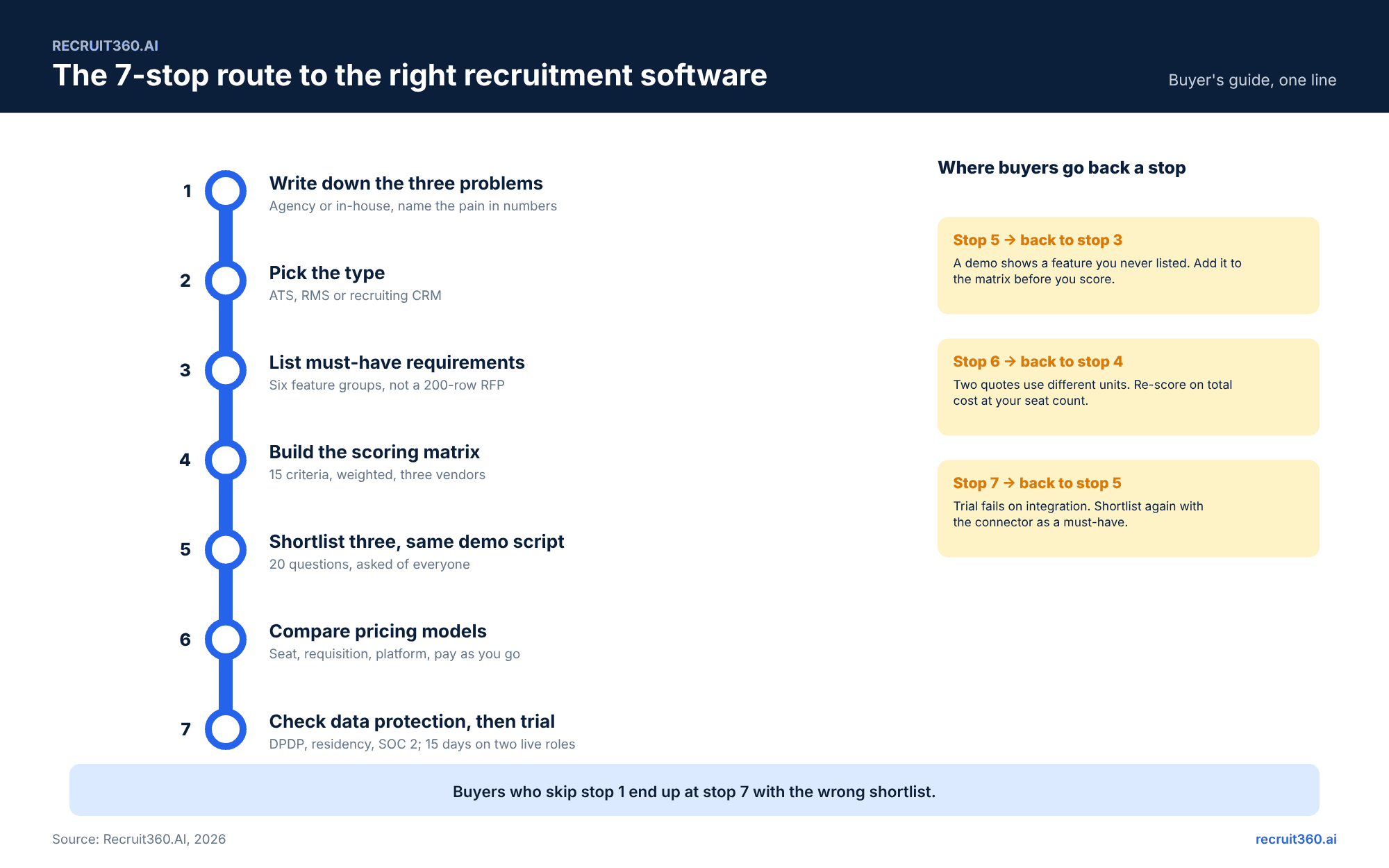
Step 1. Decide which type you need: ATS, RMS or recruiting CRM
An applicant tracking system runs the pipeline from application to offer. A recruitment management system runs the whole lifecycle: requisition approval before the job opens, agency submissions through a vendor portal, interview and offer workflow, and reporting across all of it. A recruiting CRM runs outreach to people who have not applied. Most buyers need an RMS and are shown an ATS, because ATS is the older word. The full comparison is in RMS vs ATS vs recruiting CRM. For this step, the test is short: if any of your three problems sits before the application (approval, headcount, agencies) or after the offer (joining, HRMS), you need an RMS.
Step 2. List the must-have recruitment software requirements
Six groups cover every requirement a hiring team has. List yours under each, and mark each one must-have or nice-to-have. A list longer than twenty must-haves is a list that has not been argued over yet.
Requisition and approval workflow
Who can raise a requisition, who approves it, in what order, with what reminders, and whether the job can open before the last approval. Whether the requisition carries budget, headcount plan and cost centre.
Sourcing, parsing and AI matching
Which job boards post from the system (Naukri, LinkedIn, Indeed), whether resumes are parsed into fields, whether the AI matching shows a reason beside each ranked candidate, and whether a recruiter can override the ranking and have the override logged. The guide to the AI recruitment management system explains what to look for in each layer.
Vendor portal and agency submissions
Whether agencies submit through a portal with submission limits, duplicate checks and source stamps, or whether their CVs still arrive by email. For any team that uses even one agency, this is a must-have.
Interview scheduling, AI interviews and candidate communication (WhatsApp, email)
Self-service slot booking, calendar sync, structured scorecards, an AI first-round interview and AI screening calls if your volume needs them, and candidate messages on WhatsApp and email sent from templates on a stage change. See AI interview software and screening calls for what to ask.
Reporting and recruitment analytics
Time to fill, time to hire, stage conversion, source of hire, agency fill rate, offer acceptance, all by department and by recruiter, without an export to a spreadsheet.
Integrations: HRMS, Naukri, LinkedIn, calendar, payroll
The named connectors you need, and the API reference you can read before you sign. Each integration is a line in the quote; the pricing step covers that.
Step 3. Build the scoring matrix
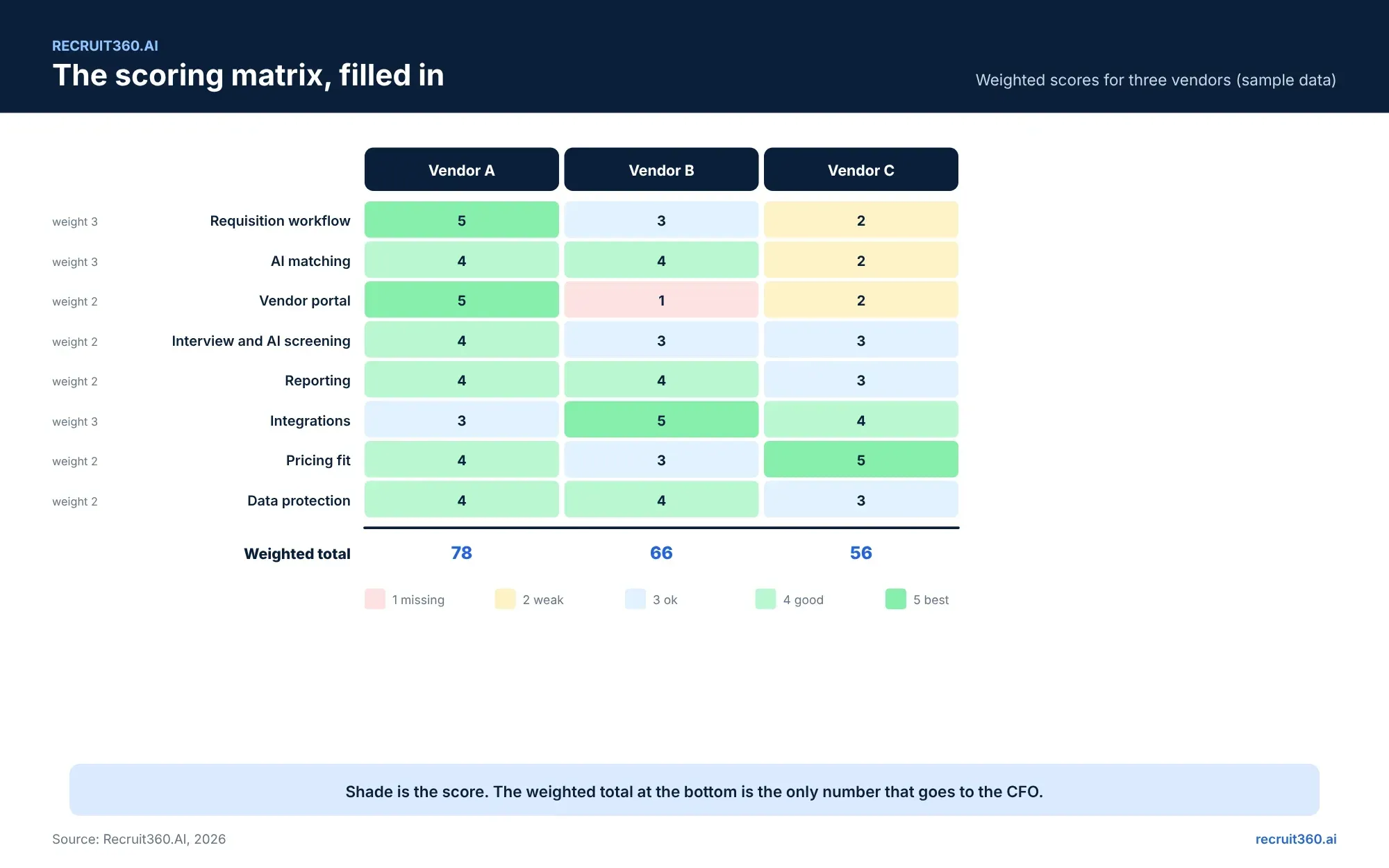
Fifteen criteria, a weight from 1 to 3 on each, three vendor columns, a score from 1 to 5 in every cell. Multiply, add, compare. The matrix is built before the first demo so the demo fills it rather than shapes it.
| Criterion | Weight | Vendor A | Vendor B | Vendor C |
|---|---|---|---|---|
| Requisition and approval workflow | 3 | |||
| AI matching with a reason per candidate | 3 | |||
| Recruiter override, logged | 2 | |||
| Vendor portal with limits and duplicate checks | 2 | |||
| Job board posting (Naukri, LinkedIn) | 2 | |||
| Interview scheduling and scorecards | 2 | |||
| AI interview and screening calls | 1 | |||
| WhatsApp and email templates | 2 | |||
| Reporting without exports | 2 | |||
| HRMS and payroll integration | 3 | |||
| Implementation time | 2 | |||
| Pricing model fit at your size | 2 | |||
| Data protection: DPDP, residency, SOC 2 | 2 | |||
| Support in your time zone | 1 | |||
| Exit: data export in a usable format | 1 |
Step 4. Shortlist three vendors and run the same demo script
Three vendors, not seven. Two is not a comparison and four is a month of meetings. Pick them from the matrix's must-have rows: any vendor that cannot do a weight-3 row is out before the demo. Then run the same script with each, in the same order, with the same two people in the room. Score each row within an hour of the demo ending, while you still remember what you saw rather than what the salesperson said.
Step 6. Check data protection: DPDP, data residency, SOC 2, retention
Indian buyers now have four questions to ask before the trial, not after. Does the system capture consent at application with a time stamp? Can retention periods be set so candidate records are erased on a schedule? Where is the data hosted, and can it be kept in India? Does the vendor hold a SOC 2 report or ISO 27001 certificate you can read? The DPDP Act for recruiters guide explains what each answer needs to be. Recruit360.AI is SOC 2 compliant and GDPR ready; ask any vendor for the document, not the sentence.
Step 7. Run a 15-day trial on two live roles, then decide
A trial on sample data tests the demo again. A trial on two live roles tests the product. Pick one role that is open now and one that is about to open, run both through the system from requisition to shortlist, and keep the old process running beside it for the same roles.
What "good" looks like at the end of the trial (three numbers)
Days from requisition to approval, against last quarter's number. Hours of recruiter time to a reviewed shortlist, against the same role done by hand. Number of agency or duplicate problems caught that the old process would have missed. If two of the three improved, the matrix total decides between vendors. If none did, the problem was not the software.
Common mistakes when choosing recruitment software
Buying on the demo rather than the matrix. Letting the vendor set the agenda for the demo. Counting features rather than weighting them. Comparing an ATS quote to an RMS quote as if they were the same product. Forgetting the HRMS integration until the contract is signed. Skipping the exit question, and finding out at renewal that the data export is a PDF. Choosing the tool the previous HR head used, at the previous company, for different problems.
Why choose Recruit360.AI over other RMS software?
Run the matrix on Recruit360.AI and the weight-3 rows are the ones it was built for. Requisition and approval routing with reminders and a time stamp. The Profile Recommendation Engine, which parses, matches on meaning, scores against the hiring manager's must-haves and ranks with a reason beside every name, with recruiter override logged. A vendor portal for agencies with submission limits and duplicate checks. AI Interview and Agent Calling for the first round, with a recruiter reviewing every output. Recruitment analytics that answer questions 13 and 14 above without an export. Pay-as-you-go pricing, so the model row scores on your volume rather than your headcount. And the 15-day free trial, with no credit card, is exactly the two-live-roles trial in step 7.
Frequently asked questions
How do I choose recruitment software?
Write down three hiring problems with numbers, decide whether you need an ATS, an RMS or a recruiting CRM, list must-have requirements in six groups, score three vendors on a weighted matrix, run the same demo script with each, compare total cost at your seat count, check data protection, and trial on two live roles.
What is the difference between an ATS and recruitment management software?
An ATS tracks applications from apply to offer. Recruitment management software covers the stages before and after as well: requisition approval, agency submissions through a vendor portal, offers, joining and reporting across all of it.
What features should recruitment software have?
Requisition approval workflow, resume parsing and AI matching with a reason per candidate, a vendor portal for agencies, interview scheduling with scorecards, candidate messaging on WhatsApp and email, reporting without exports, and integrations with your HRMS and job boards.
How many vendors should I shortlist?
Three. Fewer is not a comparison; more turns into a month of demos nobody can score.
How long should a recruitment software trial be?
Two weeks on two live roles is enough to measure approval time, recruiter hours to shortlist, and errors caught. A longer trial on sample data proves less.
What questions should I ask a recruitment software vendor?
Twenty are listed above. The five that matter most: show the reason behind an AI ranking, show a duplicate agency submission being caught, show reporting without an export, show the HRMS field mapping, and show the data export format.
What is a scoring matrix for recruitment software?
A table of ten to fifteen criteria, each with a weight from 1 to 3, scored from 1 to 5 for each shortlisted vendor. Multiply, add, and the highest weighted total wins. Build it before the first demo so the demos fill it in rather than shape it.
Should recruitment software be DPDP compliant?
Yes. Any tool that handles Indian candidate data should support DPDP consent, retention and erasure. Ask vendors about data residency, SOC 2 and role-based access.
What should the trial measure?
Three numbers on two live roles: days from requisition to approval against last quarter, recruiter hours to a reviewed shortlist against the same role done by hand, and agency or duplicate problems caught that the old process would have missed. Two out of three improving is a pass.