

A recruitment management system (RMS) is software that runs the whole hiring process in one place, from the moment a manager asks for a new role to the day the hire starts. It covers job requisitions, sourcing, resume screening, interviews, offers and reporting. An applicant tracking system covers only the middle of that process. An RMS covers all of it.
Key takeaways:
- An RMS manages the full hiring lifecycle. An ATS manages applications. The difference is the requisition at the front and the reporting at the back.
- Modern RMS software adds AI screening, a vendor portal for staffing agencies, and hiring manager tools that an ATS does not have.
- The people who use it are corporate recruiters, hiring managers, HR and talent acquisition leaders, and the IT or HRIS admins who connect it to the rest of the stack.
- The right time to move from an ATS to an RMS is when requisition approval, agency hiring or funnel reporting is happening outside your system.
Most hiring teams start with a spreadsheet, move to an applicant tracking system, and then hit a wall. Requisitions get approved by email. Agencies send candidates as attachments. The monthly report takes two days to build. A recruitment management system exists to close those gaps. This guide explains what an RMS does, how it works step by step, how it compares to an ATS, a recruiting CRM and an HRIS, and what to ask before you buy one.
What a recruitment management system does
A recruitment management system is the system of record for hiring. Every open role, every candidate, every agency submission and every interview note lives in it. TechTarget defines an RMS as "a set of tools designed to manage the employee recruiting and hiring process" and calls it possibly the most important core HR system (TechTarget).
That definition is broad on purpose. The point of RMS software is scope. It starts before the job is posted and ends after the hire is made.
The hiring lifecycle an RMS covers, from requisition to onboarding
Think of hiring as six stages. A manager requests a role. Recruiters source candidates. Someone screens the resumes. Interviews happen. An offer goes out. Reports get written. An RMS holds all six. An ATS holds the middle four at best.
Who uses an RMS: recruiters, hiring managers, HR leaders and HRIS admins
Four groups work in the system every week, and each one sees a different screen.
- Corporate recruiters run the pipeline: sourcing, screening, scheduling, and keeping candidates warm.
- Hiring managers approve requisitions, review shortlists and give interview feedback. They are in the system a few minutes a day, so their view has to be simple.
- HR and talent acquisition leaders watch the numbers: time-to-fill, stage conversion, source of hire, agency performance.
- IT and HRIS admins own the integration. They connect the RMS to the HRIS, single sign-on, job boards and the vendor portal, and they set who can see what.
How a recruitment management system works, step by step
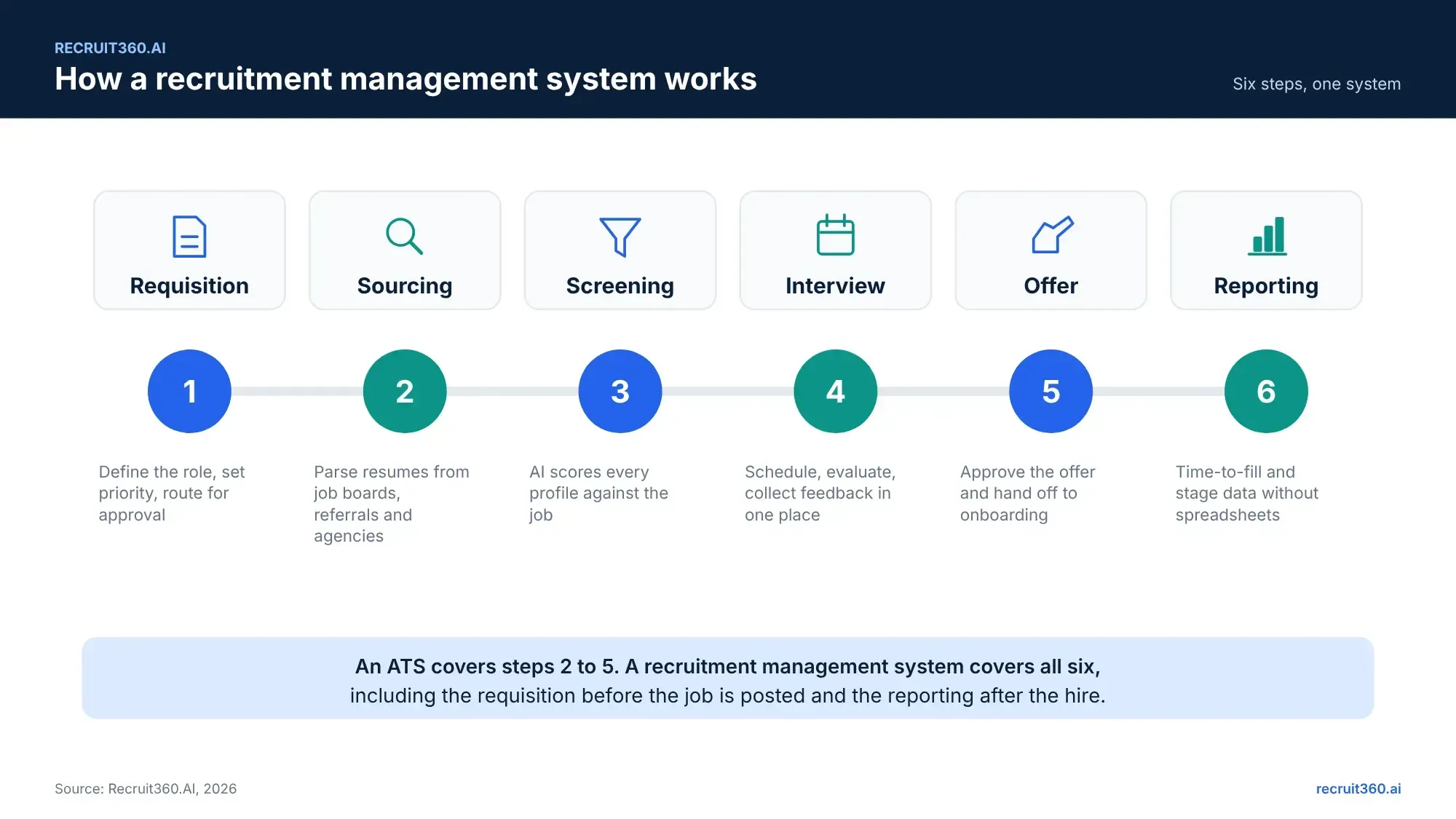
1. Job requisition and approval
A hiring manager opens a requisition inside the system. It carries the job title, must-have skills, salary band, location and priority. The requisition routes to the people who have to sign off. Nobody chases an email thread. When the last approval lands, the job is live.
2. Sourcing and resume parsing
The RMS posts the role to job boards and, if you use agencies, shares it through the vendor portal. Every resume that comes back is parsed. Parsing pulls out roles, dates, skills, tools and education and stores them as fields, so the candidate is searchable from day one.
3. Screening and shortlisting
This is where an AI recruitment management system earns its name. The system scores every candidate against the requisition and ranks them. A recruiter opens the role and sees the best matches first, each with a one-line reason. Our post on AI resume screening walks through how that scoring works and where it needs a human check.
4. Interview scheduling and evaluation
Interviewers get calendar slots. Candidates pick a time. After each round, the interviewer scores and comments on the candidate record. The hiring manager sees every score in one place, not across six emails.
5. Offer and onboarding handoff
The offer is drafted from a template, approved in the system and sent. When the candidate accepts, the record moves to the HRIS or onboarding tool through an integration. The recruiter does not re-key the data.
6. Reporting and analytics
Because every stage is timestamped, the reports write themselves. Time-to-fill by department. Where candidates drop out. Which agency sends people who get hired. The HR leader reads a dashboard instead of waiting for a spreadsheet.
RMS vs ATS vs recruiting CRM vs HRIS
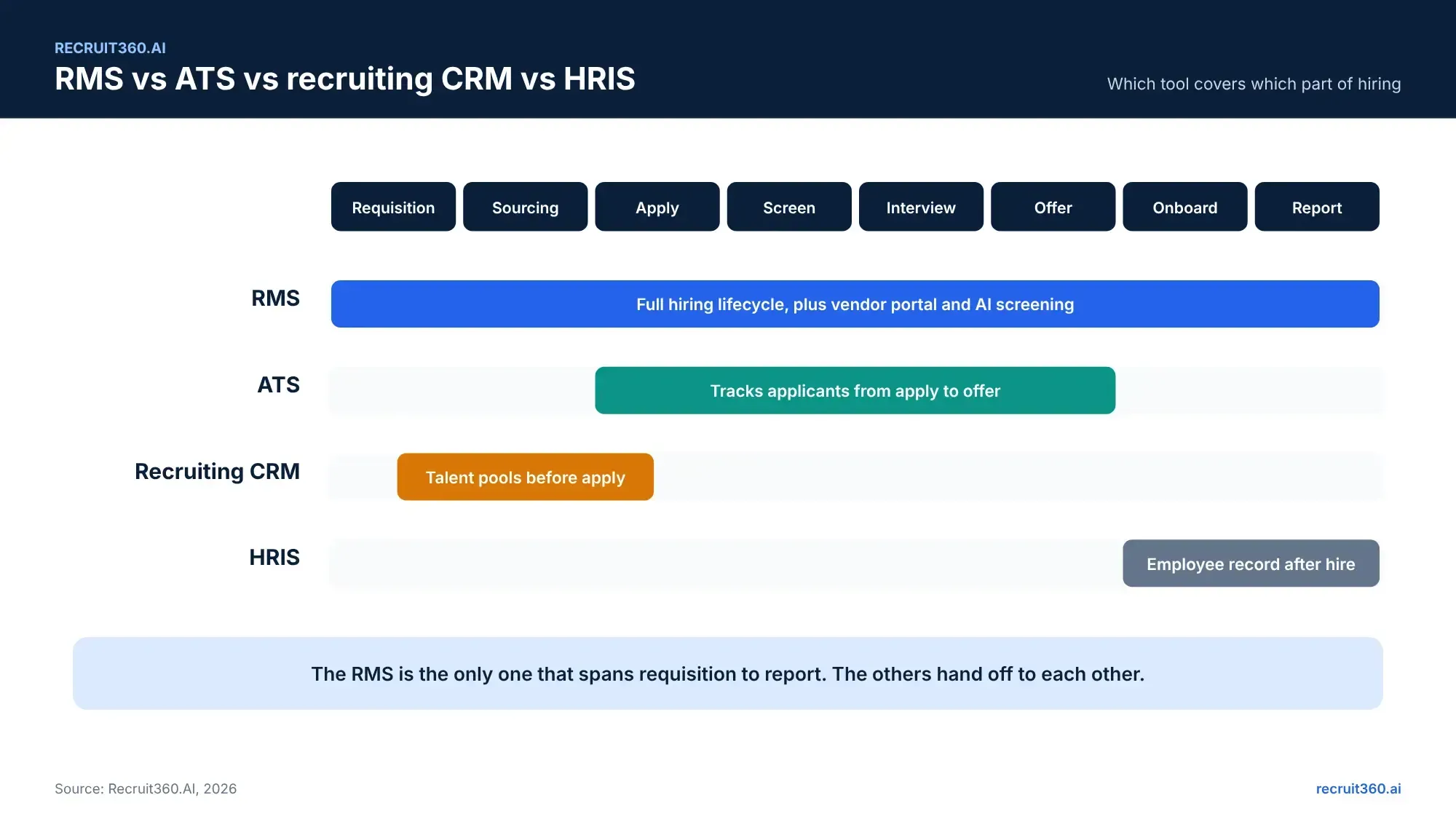
Four systems get mixed up in buying conversations. Here is what each one does and where it stops. For the long version, with five practical differences and a five-question test, read RMS vs ATS vs recruiting CRM: which one does your team need.
| Recruitment management system | Applicant tracking system | Recruiting CRM | HRIS | |
|---|---|---|---|---|
| Scope | Requisition to onboarding | Application to offer | Talent pools before application | Employee record after hire |
| Starts at | Hiring manager's request | First application | First contact with a prospect | Signed offer |
| Ends at | Hire handed to HRIS, report filed | Offer accepted | Candidate applies | Employee leaves |
| Who owns it | Talent acquisition | Recruiting | Sourcing or employer brand | HR operations |
| AI role | Screening, scoring, ranking across the pipeline | Filters and, in newer tools, scoring | Outreach suggestions | Little or none |
| Vendor portal | Built in | Rare | No | No |
| Reporting | Whole funnel, by stage and by agency | Application metrics | Engagement metrics | Headcount and payroll |
| Best for | Teams hiring at volume, with agencies, across many managers | Teams with inbound volume and a simple process | Teams that source passive candidates | Every company, for the employee record |
When an ATS is enough and when it is not
An ATS is enough when candidates come to you, one recruiter owns each role end to end, and reporting means counting applications. Many small teams sit here for years and that is fine.
An ATS stops being enough when three things happen. Requisitions need approval from more than one person. Staffing agencies send you candidates. And leadership asks a question the ATS cannot answer, such as why engineering roles take 60 days and sales roles take 25. At that point the work has moved outside the system, and the system has to grow to catch up.
Core features of RMS software, from requisition approval to analytics
Vendors list dozens of features. Six matter. The rest are variations on these.
Requisition management and approval workflows
Create a role, set priority, route it for approval, track it to closure. If a tool cannot do this, it is an ATS with a new label.
Candidate database and resume parsing
One searchable record per person, even if they applied three times through two agencies. Parsing turns every resume into fields you can filter on.
AI matching, profile recommendation and candidate ranking
The system reads the requisition and the resume and ranks candidates by fit. Good tools show the reason beside the score. Better tools let a recruiter override the rank and keep a log of the change.
Vendor and staffing partner portal
Agencies log in, see the roles you shared with them, and submit candidates. The system checks for duplicates and records which agency sent whom and when. Our guide to vendor management systems for recruitment covers this in detail.
Collaboration and stage tracking
Recruiters, hiring managers and interviewers comment and score on the same record. Every candidate has a stage. Every stage has a date.
Analytics and reporting
Time-to-fill, time-to-hire, stage conversion, source of hire and agency performance, without an export to Excel.
Benefits of a recruitment management system
The benefits of RMS software depend on who you ask. Each role gets a different one.
For corporate recruiters
You open a role and see a ranked shortlist, not an inbox. The hours you spent reading resumes go into calls with the top ten. Scheduling runs itself. When an agency sends a duplicate, the system catches it before you do.
For hiring managers
You approve a requisition in two clicks. You see five strong profiles instead of fifty mixed ones, each with a reason it made the list. Your interview feedback goes into the same record everyone else sees, so you stop repeating yourself on calls.
For HR and talent acquisition leaders
You get the funnel in one view. Where do candidates drop out? Which agency delivers? Which department's requisitions sit unapproved for a week? The answers are in the dashboard, not in a request to an analyst.
For IT and HRIS admins
One system to secure instead of four. Role-based access, single sign-on, an API to the HRIS, and a vendor portal that keeps agencies outside your core systems. Fewer integrations to maintain and one audit trail for candidate data.
What an AI recruitment management system adds
An RMS without AI still beats an ATS on scope. An AI recruitment management system changes what happens at the screening stage. Two things are different.
Semantic matching instead of keyword filters
A keyword filter looks for the phrase in the job description. If the resume uses a different phrase for the same work, the candidate disappears. Semantic matching reads for meaning. A "growth hacker" who ran paid acquisition matches a "performance marketer" role, and the recruiter sees why.
Predictive scoring that learns from your hires
The system looks at who you hired, who passed probation and who left early, and adjusts the ranking for your company. In the first month it reflects your job descriptions. By the sixth it reflects your outcomes. Our guide to the AI recruitment management system explains how the model works and the guardrails it needs.
How the screening step scores and ranks resumes is explained in our guide to AI resume screening.
How to choose a recruitment management system: vendor questions and pricing models
8 questions to ask a vendor
- Can a requisition be created, approved and tracked inside the system, with a log of who approved what?
- Show me a resume that uses different words from the job description and still ranks well.
- Where is the reason for a candidate's score, and can a recruiter override the rank?
- Do staffing agencies get their own login, and how does the system handle duplicate submissions?
- Which HRIS, job boards and calendar tools does it connect to, and is there an API?
- What reports exist out of the box, and can I build one without a developer?
- Where is candidate data stored, for how long, and is the platform SOC 2 and GDPR compliant?
- What does implementation take, in weeks and in people from my side?
Pricing models and what drives cost
Recruitment management software is priced three ways: per recruiter seat per month, per open requisition, or a flat platform fee with tiers by company size. Seat pricing suits small teams. Requisition pricing suits agencies. Platform pricing suits enterprises with many occasional users such as hiring managers. Ask for the implementation fee and the per-integration cost separately; both are often quoted after the first call. Recruit360.AI offers a 15-day free trial with no credit card and pay-as-you-go pricing after it, so you can test the workflow on a live role before you look at a quote. For a breakdown of what recruitment software costs in India, including per-seat, per-requisition and pay-as-you-go models, read the pricing guide linked below.
Frequently asked questions about recruitment management systems
What is a recruitment management system?
A recruitment management system is software that manages hiring from job requisition to onboarding. It holds every role, candidate, interview and agency submission in one place and reports on the whole process.
What is the difference between an RMS and an ATS?
An ATS tracks applications after people apply. An RMS covers the full lifecycle: requisition approval before the job is posted, AI screening, vendor submissions, hiring manager collaboration and funnel reporting. Most RMS software includes ATS functions.
Do small companies need an RMS?
Not always. A team with one recruiter, inbound applicants and no agencies can run on an ATS. An RMS pays off once approvals, agencies or reporting move outside the system.
Can an RMS integrate with an HRIS?
Yes. A good RMS sends the hired candidate's record to the HRIS through an API, so nobody re-keys data. Ask the vendor which HRIS platforms are supported out of the box.
How much does recruitment management software cost?
Pricing runs per seat, per requisition or per platform tier. Costs vary widely by vendor and company size. Ask for implementation and integration fees as separate lines.
Is an RMS the same as recruitment software?
"Recruitment software" is the umbrella term. It includes ATS, recruiting CRM, sourcing tools and RMS. An RMS is the one that covers the whole lifecycle.