

Recruitment automation is the use of software rules, workflows and AI to complete repeat hiring tasks without a person doing each one by hand: routing requisitions for approval, posting jobs, parsing and screening resumes, sending candidate updates, scheduling interviews, checking agency submissions and building reports. It does not remove the recruiter. It removes the parts of the job that did not need one.
Key takeaways:
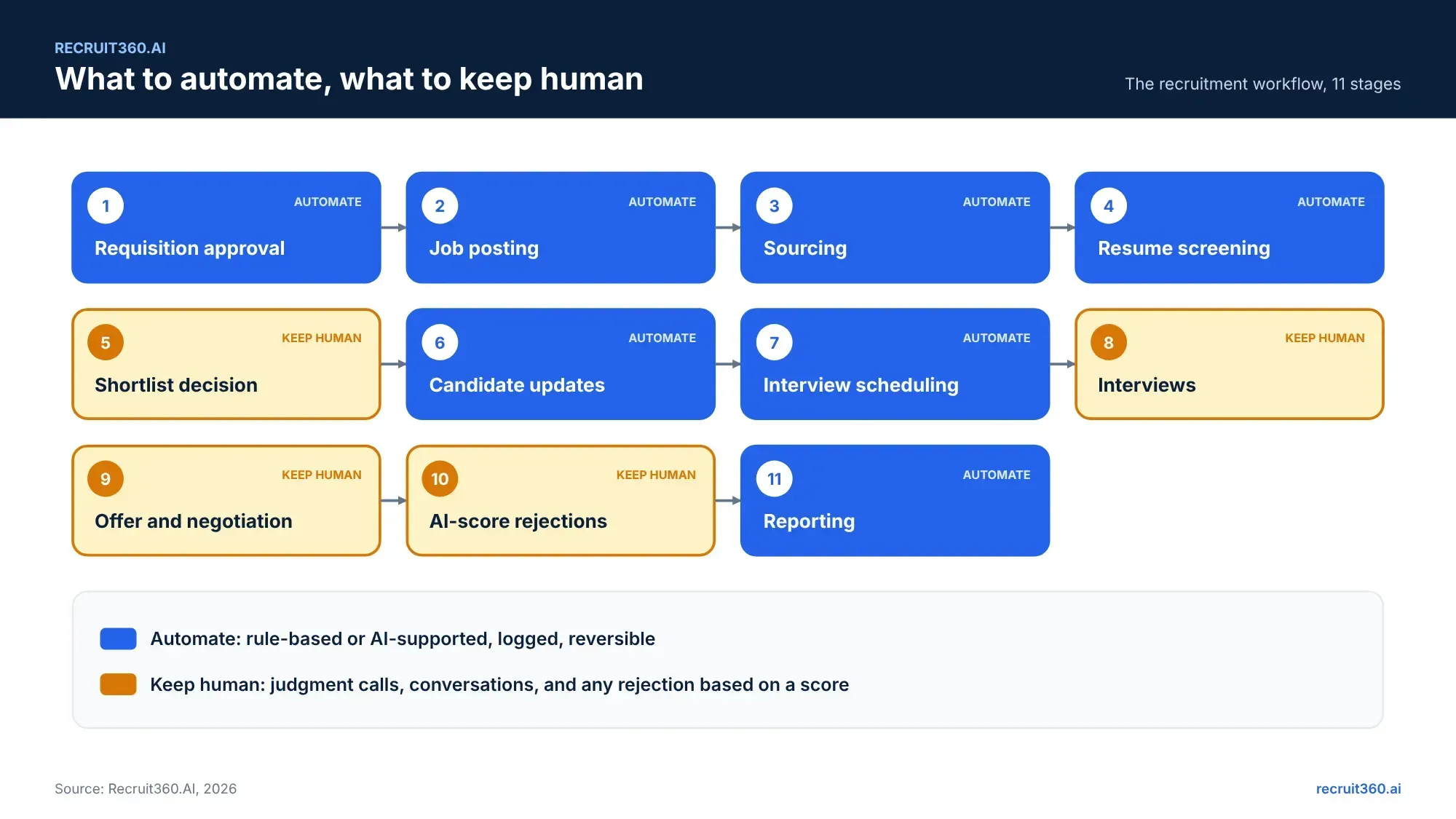
- Seven hiring stages can be automated today. Four should stay with people: the shortlist call, the interview, the offer, and any rejection based on a score.
- Rule-based automation is safe and old. AI-supported automation is newer and needs a review step.
- Most hiring time is lost between stages, not inside them. Automation fixes the hand-offs.
- Roll it out one stage at a time over 90 days, with a gate question at each phase.
IBM defines recruitment automation as the use of technology to make the talent acquisition process more efficient, data-driven and consistent, so that HR teams can focus on work that needs human judgment (IBM). That last clause is the point. Nobody buys automation to remove recruiters. They buy it because recruiters spend half the week on tasks a rule could do. This guide lists what to automate, what to keep human, the tools involved, and a 90-day plan to get there.
What recruitment automation is (and is not): triggers, rules and actions
Recruitment process automation is a trigger, a rule and an action. A candidate applies (trigger). The system checks whether they answered the knockout question (rule). It sends a confirmation and moves them to screening, or sends a polite decline (action). Multiply that across every stage and you have recruitment workflow automation.
Rules-based automation vs AI-supported automation
Recruiterflow's glossary separates the types well: rule-based automation is deterministic, the same input always gives the same output; AI-supported automation handles inputs that are not structured, such as a resume written in prose (Recruiterflow). The first is safe to run without review. The second is not.
| Type | How it works | Hiring example | Risk | Control |
|---|---|---|---|---|
| Rule-based | If X, then Y, every time | Confirmation email on application; route requisition to approver | A wrong rule fires a thousand times | Review the rule once |
| Sequence | A timed chain of actions with exits | Three-touch candidate follow-up that stops on reply | Candidates get a message after they replied elsewhere | Exit conditions on every step |
| AI-supported | A model reads unstructured input and proposes an action | Parse a resume; rank a shortlist; suggest a reply | Bias, unexplained output | A person reviews and can override; the override is logged |
For the AI half, read AI in recruitment: benefits, risks and a rollout plan. This post covers the whole workflow.
Where recruiting teams lose time without automation: the hand-offs between stages
The five hand-offs that stall a requisition
Time is lost between stages, where one person waits on another. Five hand-offs cause most of it.
- Hiring manager to approver: the requisition sits in an inbox.
- Recruiter to job boards: the same role is posted by hand to four sites.
- Applicant to recruiter: resumes pile up until someone has a free afternoon.
- Recruiter to hiring manager: the shortlist goes over by email and feedback comes back in chat.
- Interviewer to scheduler: three emails to find one slot.
Each hand-off is a trigger waiting for a rule. That is what recruitment automation software does: it watches for the trigger and takes the next step. The post on time to fill vs time to hire shows how to measure where your own days go.
What you can automate across the hiring workflow: seven stages from requisition to reporting
Seven stages. Each one is a trigger, a rule and an action that a recruitment management system runs without a person pressing a button.
1. Job requisition and approval routing
A hiring manager submits a requisition. The system routes it to the approvers in order, reminds whoever is sitting on it, and opens the job the moment the last approval lands. The days a requisition used to wait in an inbox become hours.
2. Job posting and sourcing
One approved requisition posts to every job board you use and, through the vendor portal, to the agencies you choose. No copying the description four times.
3. Resume parsing, screening, AI interviews and agent calling
Every resume is parsed into fields and scored against the role. The recruiter opens a ranked list, not an inbox. This is AI-supported automation, so the recruiter reviews the ranking and can override it. Our guide to AI resume screening covers the four steps.
The same stage now runs the first conversation. In Recruit360.AI, Agent Calling phones shortlisted candidates, confirms interest, notice period and expected pay, and writes the answers to the record. AI Interview runs a structured first-round interview at a time the candidate picks and returns a transcript and a summary. Both are AI-supported automation. A recruiter reads the output before anyone moves to the next stage, and no candidate is dropped on a score alone. The guide to AI interview software and screening calls covers formats, costs and the rules in India.
4. Candidate communication and status updates
Confirmation on application. An update when a stage changes. A reminder before an interview. A decline with a reason when the role closes. All rule-based, all sent from templates a person wrote once.
5. Interview scheduling
Interviewers share availability. Candidates pick a slot. Calendar invites go out. Reschedules happen the same way. The three-email dance ends.
6. Vendor submissions and duplicate checks
An agency submits through the portal. The system checks the candidate against every record you hold, records which agency sent them first, and drops them into the same pipeline as direct applicants.
7. Reporting, analytics and dashboards
Every stage is timestamped. Time-to-fill by department, stage conversion, source of hire and agency fill rate build themselves. The monthly report is a link, not a project.
What to keep human: the shortlist call, the interview decision, the offer and any rejection
Four stages stay with people. Not because software cannot touch them, but because the cost of getting them wrong is too high.
The final shortlist call
The AI ranks. A recruiter decides who the hiring manager meets, reading past the top ten for the career changer the model ranked lower.
Interviews and feedback
AI can run the first screening round, transcribe and summarise. It should not make the hiring decision. The interviewer's judgment, written on the candidate record, is the input that matters.
Offers and negotiation
Templates and approval routing speed the offer up. The conversation about it is a person's job.
Any rejection based on an AI score
No candidate is declined because a model scored them low. The score is advisory. The decision is logged with a name. In New York City and under the EU AI Act, this is not advice; it is the law.
Benefits of recruitment automation, by role
Corporate recruiters
The inbox stops being the pipeline. Resumes are parsed and ranked before you look. Scheduling runs itself. Candidates get updates without you writing them. The hours go into calls.
Hiring managers
Your requisition is approved in days, not weeks, and you can see where it is. The shortlist arrives ranked with reasons. Your feedback goes into the record, so you give it once.
HR and talent acquisition leaders
You get the funnel without asking for it: requisition age, time-to-fill, stage conversion, agency performance. You see which hand-off stalls, and you fix the rule, not the recruiter.
IT and HRIS admins
Fewer tools glued together with scripts. One system that triggers, routes and logs, with an API to the HRIS and a scoped portal for agencies. One audit trail.
Recruitment automation software: ATS, RMS, recruiting CRM, scheduling tools and APIs
IBM's guide lists the components: applicant tracking systems, chatbots, CRMs, integration workflows, scheduling and video platforms, real-time metrics, and screening and matching algorithms (IBM). In practice those land in three places.
ATS, RMS and recruiting CRM
The system of record. An ATS automates the application pipeline. A recruitment management system automates the whole lifecycle, including approval routing and vendor submissions. A recruiting CRM automates outreach sequences to people who have not applied. The AI recruitment management system adds the AI-supported stages to the same system.
Scheduling and video interview tools
Calendar sync, self-service booking, reminders, and transcription. Often built into the RMS; sometimes a standalone tool connected by API.
Integration layers and APIs
The connection between the RMS, the HRIS, job boards and the calendar. If the vendor cannot show an API reference, every automation that crosses a system boundary will need a manual step.
How to implement recruitment automation in 90 days: map, pilot, measure, expand
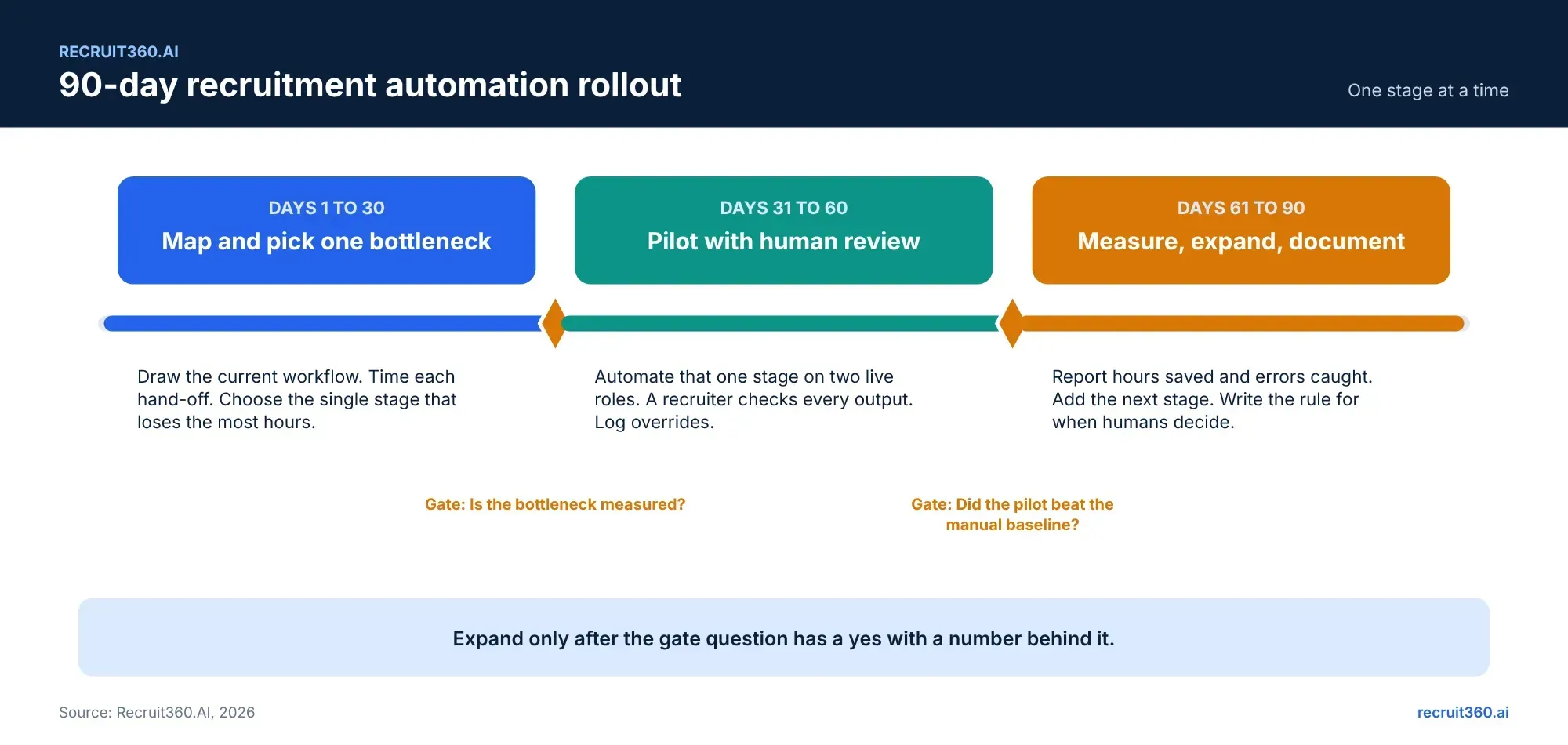
One stage at a time. A gate question at each phase. No expansion without a yes with a number behind it.
Days 1 to 30: map the workflow and pick one bottleneck
Draw the current process on one page. Time each hand-off for the roles you ran last quarter. Pick the single stage that loses the most hours. Usually it is approval routing or resume screening. Gate: is the bottleneck measured, in hours or days?
Days 31 to 60: pilot with human review
Automate that one stage on two live roles. Keep the old process running beside it. A recruiter checks every automated output and logs every override. Gate: did the pilot beat the manual baseline on time, without losing quality?
Days 61 to 90: measure, expand, document
Report hours saved and errors caught. Add the next stage. Write the one-page rule for when a person decides and when the system does. Gate: is the rule written and signed by the HR leader?
Recruit360.AI runs this pilot inside the free trial. Bring the stage you picked in days 1 to 30 and two live roles.
Frequently asked questions
What is recruitment automation?
Recruitment automation uses software rules, workflows and AI to complete repeat hiring tasks: routing approvals, posting jobs, screening resumes, sending updates, scheduling interviews, checking agency submissions and building reports. A person still makes the hiring decision.
Will recruitment automation replace recruiters?
No. It removes the tasks that did not need a recruiter, such as copying a job to four boards or finding an interview slot. Recruiters spend the time on candidates instead.
What is the difference between recruitment automation and AI recruiting?
Automation runs rules: if this, then that. AI recruiting uses models that learn patterns, such as ranking resumes by fit. Most platforms use both. Rules need checking once; AI output needs a review step every time.
What should you automate first in recruiting?
The stage that loses the most hours, measured. For most teams that is requisition approval routing or resume screening. Pick one, pilot it on two roles, and expand after it beats the manual baseline.
How do you measure recruitment automation ROI?
Hours saved per role at the automated stage, days cut from time-to-fill, errors caught (duplicates, missed approvals), and recruiter time moved to candidate conversations. Compare against the same roles run by hand.