
WhatsApp recruiting means sending candidates short, specific messages at each hiring stage, from application to joining, on the channel they already answer. Done from a recruiter's personal phone it gets numbers blocked and leaves no record. Done through the WhatsApp Business API from inside a recruitment management system, with the candidate's opt-in stored, it sends approved templates on every stage change, logs replies to the candidate record, and cuts interview no-shows and offer drops. Meta charges per message in India, with marketing messages priced above utility messages, and requires opt-in before a business starts a conversation.
Key takeaways:
- The number that matters is not open rate. It is interview show-up rate and offer-to-join rate, and WhatsApp moves both when the messages are timed to the stage.
- Opt-in first. Meta's policy requires it, and the DPDP Act will require a notice behind it from May 2027.
- Under about fifty candidates a month the free Business App works. Above that, or with more than one recruiter, use the API through a provider.
- Every message should have one action and one reply option. Replies belong on the candidate record, not in a recruiter's chat history.
- Seven templates cover the whole funnel. The joining message is the one that pays for the rest.
The pages that rank for WhatsApp recruiting are written by companies that sell the WhatsApp API . They are good on open rates and thin on what a recruiter should type. This guide is the recruiter's version: why WhatsApp works for Indian hiring and how it goes wrong, the Business App against the API, the opt-in and consent rules, seven ready templates by stage, how to run it inside your recruitment management system, and the three numbers to measure.
Why WhatsApp recruiting works in India, and where it goes wrong
Open rates vs reply rates: the number that matters is show-up rate
WhatsApp messages get read; that is not in dispute. What a hiring team needs is for the candidate to turn up to the interview and to join on the date. In Talview's platform data, close to one interview in five is a no-show, and the rate climbs to more than one in four when the slot is booked with less than a day's notice. Industry estimates in India put offer drop somewhere between a quarter and a third of accepted offers. A reminder the day before the interview and a check-in every two weeks of the notice period are the two messages that move those numbers. Measure show-up and join, not opens.
Four ways recruiters get blocked or reported
Sending a job to a list of numbers that never opted in. Sending the same message to hundreds of contacts from a personal number, which trips WhatsApp's spam controls. Messaging at 9 pm. Sending a marketing message when the candidate asked for an interview time. Each one gets a number reported, and a reported business number loses its ability to send.
WhatsApp Business App vs WhatsApp Business API for recruitment
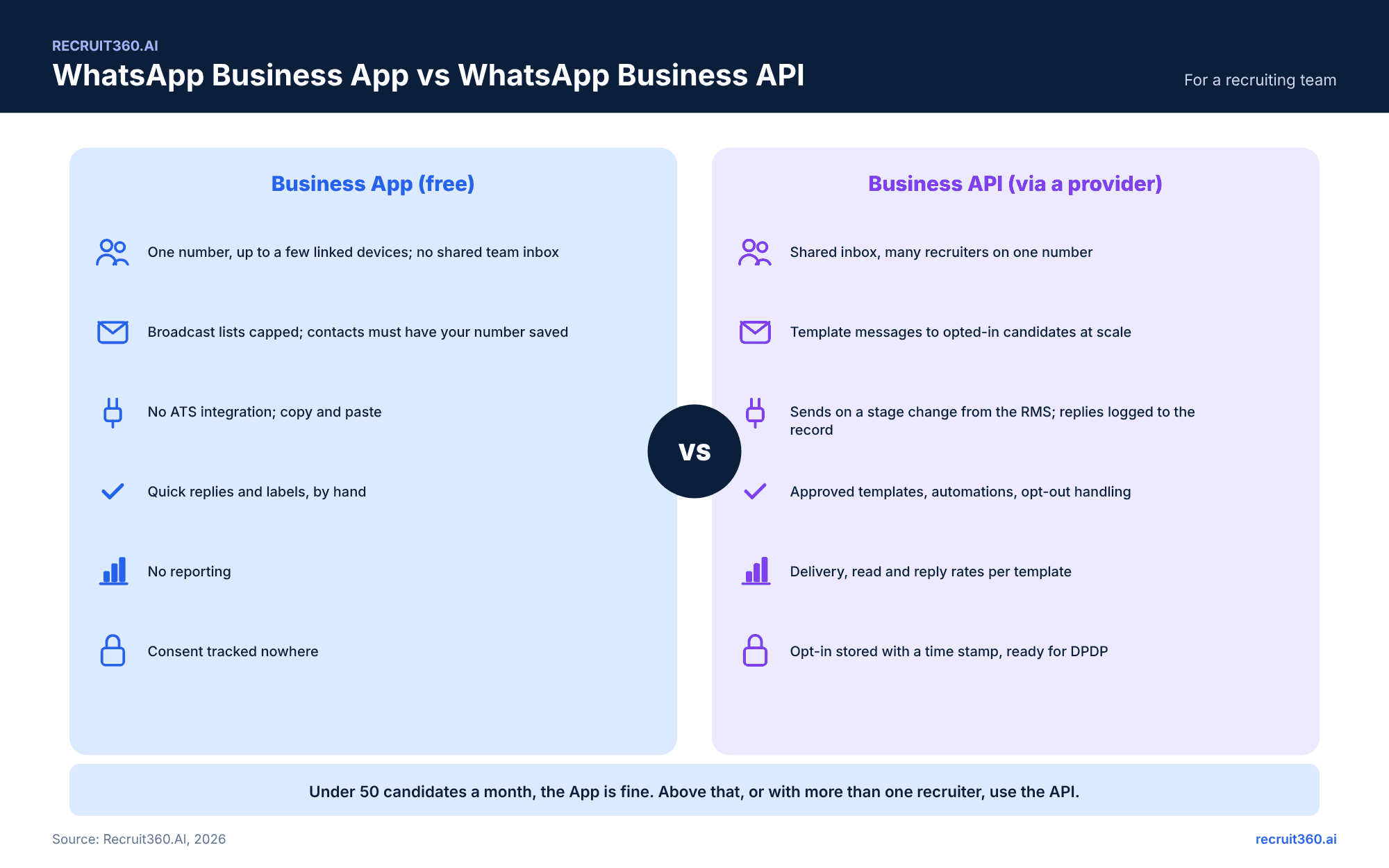
| WhatsApp Business App | WhatsApp Business API | |
|---|---|---|
| Cost | Free to download | Per message from Meta plus the provider's fee |
| Who sends | One number on a phone, with a few linked devices | Many recruiters on one number through a shared inbox |
| Reach | Broadcast lists capped at 256 contacts, delivered only to people who saved your number | Template messages to any opted-in candidate at scale |
| Templates | Quick replies typed by hand | Templates approved by Meta before use |
| Opt-in | Tracked nowhere | Stored with a time stamp |
| ATS integration | None; copy and paste | Sends on a stage change from the RMS; replies logged to the record |
| Reporting | None | Delivery, read and reply rates per template |
| Fits | One recruiter, under about fifty candidates a month | A team, an agency, or anyone who needs a record |
 What the API costs in India (rates last checked 15 October 2026). Meta moved to per-message pricing on 1 July 2025, with separate rates for marketing, utility and authentication templates, and free service messages inside a 24-hour customer window once the candidate has replied (Meta pricing docs). Provider rate cards for India in late 2026 list marketing messages at about 0.86 rupees and utility messages at about 0.12 rupees each, before GST . Providers also report that from 1 October 2026 service messages beyond 1,000 a month per number become billable at the utility rate. Most recruiting messages are utility messages: a reminder, a confirmation, an update the candidate asked for. A thousand candidates through a seven-message funnel costs less than one recruiter-hour.
Which of these steps to automate, and which to keep human, is the subject of our recruitment automation guide.
Consent first: opt-in, DND and DPDP rules for candidate messages
What a valid opt-in looks like at application
Meta's policy is plain: a business may contact a person on WhatsApp only with that person's opt-in, may start a conversation only with an approved template, and outside the 24-hour window may send only approved templates. A valid opt-in is a checkbox on the application form, a YES reply to a first message that asks for it, or a click on a WhatsApp button on the careers page, each stored with the date and the number. The DPDP Act adds a notice behind the checkbox from 13 May 2027: what you will send, for what purpose, and how to stop. The DPDP Act for recruiters guide has the notice text.
What you may not send without it
No job alerts, no new-role broadcasts, no "are you open to opportunities" messages to numbers scraped from Naukri or a resume database. Those are marketing messages to people who did not opt in, and they are the fastest route to a blocked number and, after May 2027, a DPDP complaint. A candidate who applied for one role has opted in to messages about that role, not to a weekly list of others; ask separately for that.
WhatsApp recruitment message templates by stage
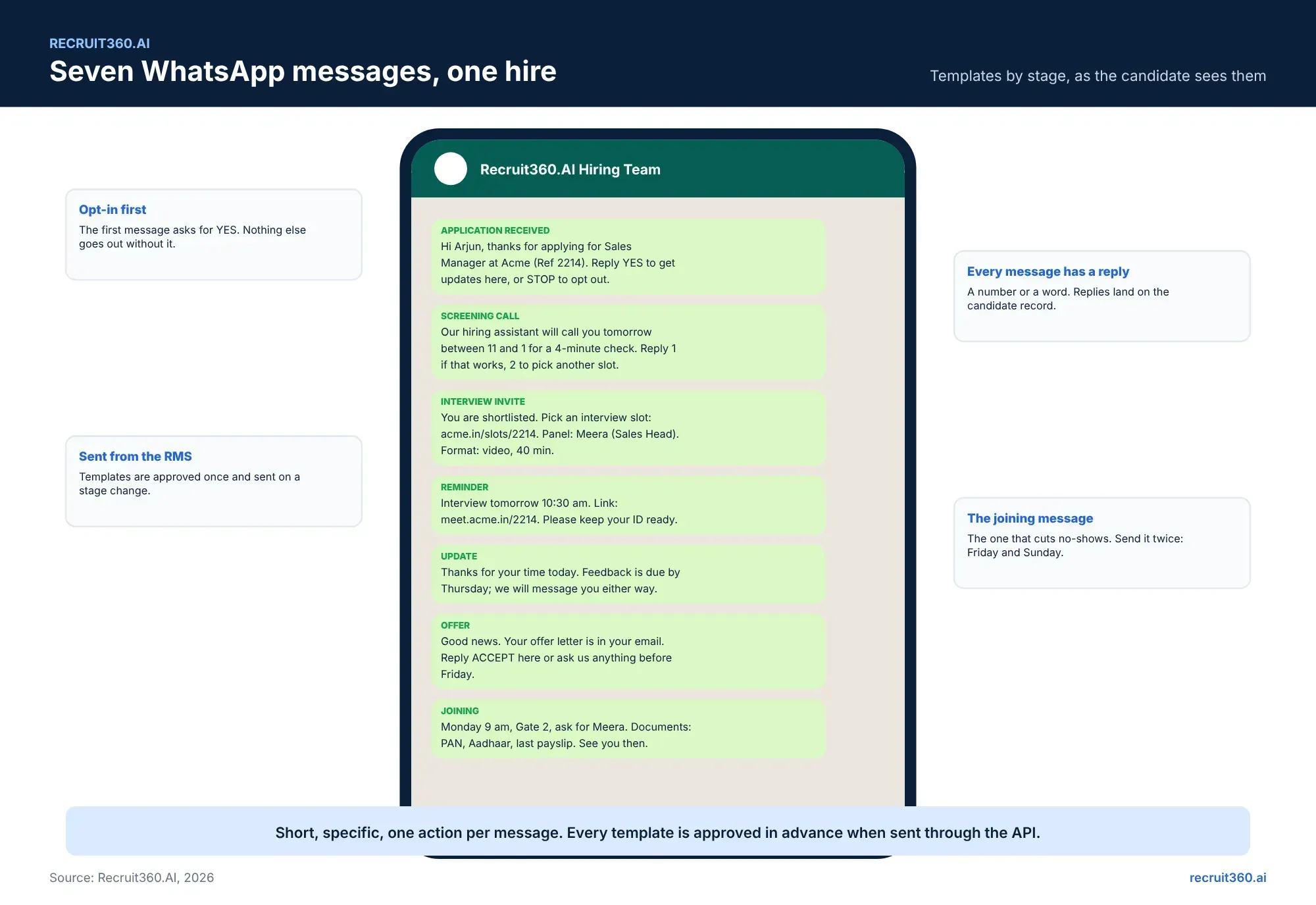
Each template is under 300 characters, names the role and the reference, asks for one reply, and includes a way out. Replace the bracketed fields. Through the API, each one is submitted to Meta for approval once and sent on a stage change after that.
Application received and screening questions
Hi [First name], thanks for applying for [Role] at [Company] (Ref [ID]). Reply YES to get updates about this role here, or STOP to opt out. Two quick questions once you reply: your current location and your notice period.
Thanks, [First name]. Two questions: 1) Which city are you in, and is [work mode] fine? 2) What is your notice period, and is buyout an option? Reply here any time.
Screening call booking (pairs with Agent Calling)
[First name], our hiring assistant will call you for a 4-minute check about [Role]. Tomorrow between 11 am and 1 pm works? Reply 1 for yes, 2 to pick another slot. The call is recorded; reply NO if you would rather a recruiter calls.
Interview invite, reminder and directions
Good news, [First name]. You are shortlisted for [Role]. Pick an interview slot here: [link]. Panel: [Name], [Title]. Format: [video / in person], [duration]. Reply HELP if the link does not work.
Reminder: your interview for [Role] is tomorrow at [time]. Link: [link]. Keep a photo ID ready. Reply R to reschedule, or just reply if anything comes up.
Post-interview update and feedback request
Thanks for your time today, [First name]. The panel's feedback is due by [day]. We will message you either way. Meanwhile, how was the interview for you, 1 to 5?
Offer, documents and joining confirmation
[First name], your offer letter for [Role] is in your email. Reply ACCEPT to confirm here, or ask us anything before [date]. Documents we will need: PAN, Aadhaar, last three payslips, relieving letter.
Joining day reminders that cut no-shows
Two weeks to go, [First name]. Anything we can help with before [joining date]? Your manager [Name] will message you next week. Reply if anything has changed on your side.
See you Monday, [First name]. [Time], [address], Gate [X], ask for [Name]. Bring the documents from our earlier message. Reply OK to confirm.
Agency to client: submission and feedback nudges
For agencies, the same channel works on the client side once the client has opted in.
Hi [Client name], three profiles for [Role] (Req [ID]) are in your portal, within the limit of three. Feedback by [day] keeps the candidates warm. Reply here or in the portal.
Running WhatsApp inside your recruitment management system
What gets logged to the candidate record
The opt-in with its time stamp. Every template sent, with delivery and read status. Every reply, in the candidate's timeline next to the interview notes and the Agent Calling transcript. The recruiter who sent a free-form message. This is the difference between a chat history on a phone that leaves with the recruiter and a record the agency owns.
Automations that are safe to run without a person
Application received, screening call booking, interview invite and reminder, post-interview update, and joining reminders run on the stage change with no one pressing send. The offer message runs when the offer is approved. Anything that answers a candidate's question is a person's job, inside the 24-hour window, from the shared inbox. Recruitment automation sets out the same split for the rest of the workflow.
Measuring WhatsApp recruiting: reply rate, show-up rate, offer-to-join
Three numbers, measured per template. Reply rate: replies divided by messages delivered, which tells you whether the message asked a clear question. Interview show-up rate: interviews attended divided by interviews scheduled, before and after the reminder template went live. Offer-to-join rate: joiners divided by offers accepted, before and after the notice-period check-ins. The recruitment metrics guide has the formulas and the benchmarks. If show-up and join do not move in a quarter, the problem is the timing or the content, not the channel.
Why Recruit360.AI fits WhatsApp recruiting in India
Recruit360.AI sends WhatsApp templates through the Business API on every stage change, with the candidate's opt-in captured at application and stored with a time stamp. Replies land on the candidate record beside the Agent Calling transcript and the interview scorecard. Templates are approved once and reused across every requisition. Agencies can run the client-side nudges from the same inbox. Delivery, read and reply rates are on the analytics dashboard per template, next to show-up rate and joining ratio, so the three numbers above are on one screen. Consent and retention follow the requisition's DPDP settings. The 15-day free trial includes the templates above, ready to edit.
Frequently asked questions
Is it legal to contact candidates on WhatsApp in India?
Yes, with opt-in. Meta's policy requires the person's permission before a business starts a conversation and requires approved templates for the first message. From May 2027 the DPDP Act also requires a notice stating what you will send and why.
Can I use my personal WhatsApp for recruiting?
You can, and most recruiters have. The problems are no opt-in record, no logging to the candidate record, a number that gets blocked when it sends in bulk, and a chat history that leaves with the recruiter. The Business App fixes none of the last three; the API fixes all of them.
What is the difference between the WhatsApp Business App and the API?
The App is free, runs on one phone with a few linked devices, caps broadcast lists at 256 contacts and has no integration. The API is sent through a provider, charged per message, supports a shared inbox and approved templates, stores opt-ins, and connects to a recruitment management system.
How much does the WhatsApp Business API cost in India?
Meta charges per message by category. Provider rate cards for India in late 2026 list utility messages at about 0.12 rupees and marketing messages at about 0.86 rupees, plus GST and the provider's fee. Most recruiting messages are utility messages. Rates change quarterly; check the provider's current card.
What should the first WhatsApp message to a candidate say?
Who you are, which role and reference, a request to reply YES for updates, and a way to opt out. Nothing else until they reply.
How do I reduce interview no-shows with WhatsApp?
Schedule 24 to 72 hours ahead, send the invite with a self-service slot link, send a reminder the day before with the link and the panel name, and offer a one-word reschedule option. Measure attended over scheduled before and after.
How do I reduce offer drops with WhatsApp?
A check-in every two weeks of the notice period, a message from the hiring manager a week before joining, and a joining-day message with time, gate and documents. Measure joiners over offers accepted.
Can WhatsApp messages be sent automatically from an ATS?
Yes, through the Business API. Approved templates send on a stage change, replies log to the candidate record, and opt-ins are stored. Recruit360.AI does this natively; other tools connect through a provider.
Can I send job alerts on WhatsApp to my resume database?
Only to people who opted in to job alerts specifically. A candidate who applied for one role has not opted in to a weekly list. Ask separately, store the answer, and honour STOP.
Can staffing agencies use WhatsApp with clients?
Yes, once the client contact has opted in, for submission notices and feedback nudges. Keep it to utility messages tied to a requirement.