
Staffing agencies manage multiple client requirements by running every job order through the same six steps: a client intake sheet, a tier and a response time per client, recruiters allocated by requirement, sourcing and submission within the client's limit, a client feedback loop on a clock, and a close that records the fill rate. The agencies that do this in a spreadsheet survive to about ten open requirements. Past that, the work moves into a recruitment management system with a requirement board, duplicate checks and a client dashboard.
Key takeaways:
- Requirements are lost at four points: intake, allocation, submission and feedback. Fix those four and the rest takes care of itself.
- Tier clients by value and set a response time per tier. Treating every client the same is the most common mistake.
- Allocate recruiters to requirements, not to clients. A client with eight open roles should not sit with one recruiter.
- Submission limits and candidate ownership rules must live in the system, not in a recruiter's memory.
- Six numbers on a Monday dashboard tell an agency owner which client to call first.
A staffing agency with three clients and five open requirements can run on email and a spreadsheet. The same agency with twelve clients and forty requirements cannot, and the moment it stops working is never announced. A requirement sits in an inbox for a week. Two recruiters submit the same candidate to two clients. A client goes quiet on four profiles and nobody chases. The ranking pages for this topic offer tips: prioritise, communicate, build relationships. This guide is about the workflow instead: the six steps a requirement takes from the client's email to the invoice, where each step breaks, and what a recruitment management system changes at each one.
Why multiple client requirements break a staffing agency
The problem is not volume. It is that each requirement has four hand-offs and each hand-off has no owner by default.
The four failure points: lost requirement, wrong recruiter, duplicate submission, silent client
The lost requirement. A client emails a job order to the account manager. The account manager forwards it to a recruiter. The recruiter is on leave. The requirement is three days old before anyone opens it, and the client has already briefed another agency.
The wrong recruiter. Agencies often allocate by client: Priya owns Client A. When Client A opens eight roles in a week, Priya has eight roles and the Java recruiter on the next desk has none.
The duplicate submission. Two recruiters pull the same profile from the database and submit it to two clients on the same day, or to the same client twice. The second one costs the agency its credibility and, with some clients, the placement fee.
The silent client. Four profiles go across on Monday. On Friday nothing has come back. The recruiter assumes rejection and moves on. The client assumes the agency has nothing else and briefs a competitor. Nobody chased because chasing was nobody's job.
Agencies comparing tools can start with our list of the best recruitment software for staffing agencies in India.
The six-step workflow for managing multiple client requirements
Each step below is a rule, an owner and a time limit. Write all three down. The software holds them; a person still has to decide them.
Step 1. Client intake: the requirement sheet every job order must complete
A requirement is not open until the intake sheet is complete. The sheet has ten fields: role title, number of positions, location and work mode, must-have skills, nice-to-have skills, budget or rate range, notice period the client will accept, interview rounds and who runs them, the submission limit per requirement, and the date the client needs someone in the seat. The account manager fills it on the call with the client, not afterwards from memory.
The sheet does two jobs. It stops the recruiter sourcing against a vague brief. And it gives the agency a record of what was agreed when the client later says the budget was always lower.
Step 2. Tier clients and set a response SLA per tier
Recruitly's guide to managing multiple clients makes the point that treating all clients equally is the most common mistake, and suggests sorting them into A, B and C tiers. The tier decides the response time. A tier one client gets a first submission inside 48 hours and a weekly call. A tier two client gets five working days and a fortnightly email. A tier three client gets best effort and no promise.
The tier is reviewed every quarter on two numbers: fees billed and the client's own response time to your submissions. A client that pays well but never gives feedback is costing you more than the fee is worth, and the tier should say so.
Step 3. Allocate recruiters by requirement, not by client
Once the sheet is complete and the tier is set, the requirement goes to the recruiter best placed to fill it, which is a question of skill domain, current load and location. Agencies that run a requirement board can see all three at a glance. Agencies that allocate by client see only the account manager's preference.
The rule that prevents overload is a cap: no recruiter carries more than a set number of open requirements at once. The number depends on the roles; eight is common for permanent IT hiring, more for high-volume contract work. When the cap is hit, the next requirement waits or goes to another desk, and the owner sees it waiting.
Step 4. Source, screen and submit within the client's submission limit
Sourcing for several clients at once has one advantage: the same search serves more than one requirement. A Java developer in Pune who does not fit Client A's budget may fit Client B's. The database, Naukri, LinkedIn and referrals all feed one pool, and the recruiter matches from the pool to the open requirements rather than searching from scratch each time.
The submission limit is the control. Most clients allow three to five profiles per requirement; a vendor management system often enforces it. The recruiter submits the best three, not the first three, and the system refuses a fourth. Each submission carries a time stamp, the recruiter's name and the source, which is the record that settles ownership disputes later.
Step 5. Run the client feedback loop on a clock
The loop is simple. Submission goes out. The clock starts. At the tier's agreed time, say two working days, the account manager gets a reminder to chase. At twice the time, the owner sees the requirement flagged on the board. At three times, the agency asks the client whether the requirement is still live.
When feedback arrives it is recorded against the candidate, not in an email thread: interview slot, score, decline reason. The decline reason is the most useful field in the whole workflow, because three declines for the same reason mean the intake sheet was wrong, and the recruiter stops sourcing until it is fixed.
Step 6. Close, invoice and learn (fill rate by client)
A placement closes the requirement, raises the invoice with the agreed fee, and records the joining date, since a candidate who does not join is not a placement. The close also writes two numbers to the client's record: time to submit and fill rate. Over a quarter those numbers decide the tier.
Candidate ownership and duplicate conflicts across clients
The same candidate will be relevant to more than one client. That is fine. The same candidate submitted to the same client by two recruiters, or by your agency and another, is not. Three rules handle it.
First, a candidate is checked against every submission in the system before a new one goes out, by email, phone number and name. Second, the first submission wins, and the record shows who and when. Third, a candidate submitted to one client is not submitted to that client's direct competitor without the candidate's say-so; the recruiter asks and logs the answer.
When the conflict is with another agency, the client decides, and the client will go with whichever agency can show the earliest time-stamped submission. Agencies that run on email cannot show one.
Working inside client vendor portals (VMS) alongside direct clients
Larger clients will not take submissions by email. They run a vendor management system and every agency submits through it, within its limits, in its format. That is one more place a requirement can hide. The fix is to treat the VMS as a source: the requirement is pulled from the portal into the same board as every direct client's requirement, worked the same way, and the submission is pushed back through the portal. Our guide to the vendor management system for recruitment covers how the portal looks from the client's side.
Managing client requirements by hand vs in a recruitment management system
| Task | Spreadsheet and email | Recruitment management system |
|---|---|---|
| Intake | A form the account manager may or may not fill | A requirement cannot open until the sheet is complete |
| Client tiers and SLAs | In the owner's head | A field on the client record that drives reminders |
| Recruiter allocation | By client, by habit | By requirement, with a load cap per recruiter |
| Submission limit | Remembered, sometimes | Enforced; the fourth submission is refused |
| Duplicate check | Search the sheet, hope | Automatic across every submission, every client |
| Client feedback | Email threads | Recorded on the candidate; reminders on a clock |
| VMS clients | A separate login and a separate process | Requirements pulled in, submissions pushed back |
| Fill rate by client | Calculated at quarter end, if at all | On the dashboard every Monday |
The weekly dashboard: six numbers an agency owner checks on Monday
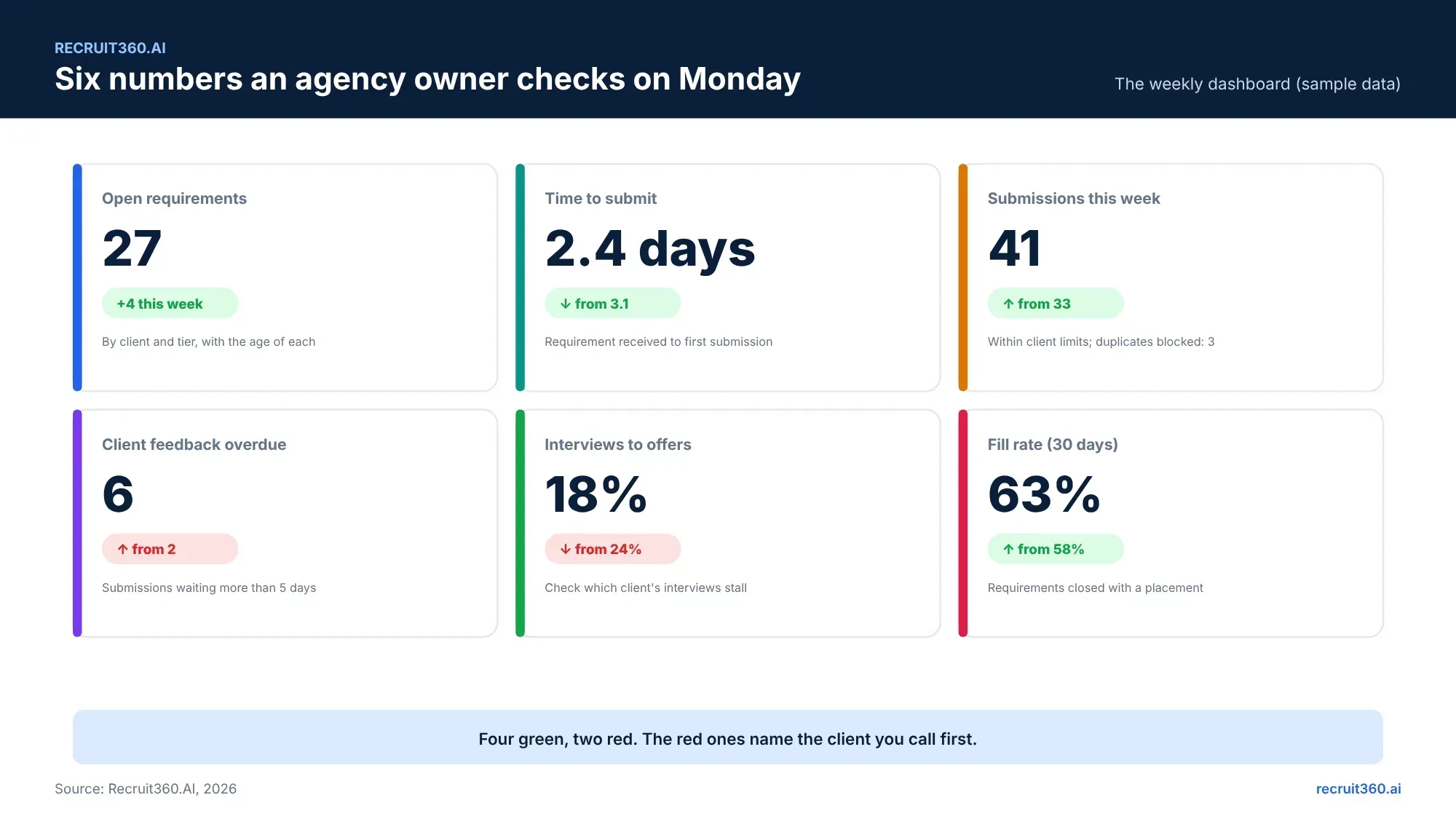
Open requirements by client and age. Time to submit. Submissions this week against limits. Client feedback overdue. Interview to offer ratio. Fill rate over thirty days. The two red tiles on any given Monday name the client to call first. The recruitment metrics guide gives the formulas and the benchmarks for each.
For a reference point, Staffing Industry Analysts' survey of North American staffing firms found a median of nine days from requirement to accepted offer for professional temporary roles, and a median fill rate of 40%. No Indian equivalent is published; your own last two quarters are the benchmark that counts.
How Recruit360.AI solves multiple client requirements for staffing agencies
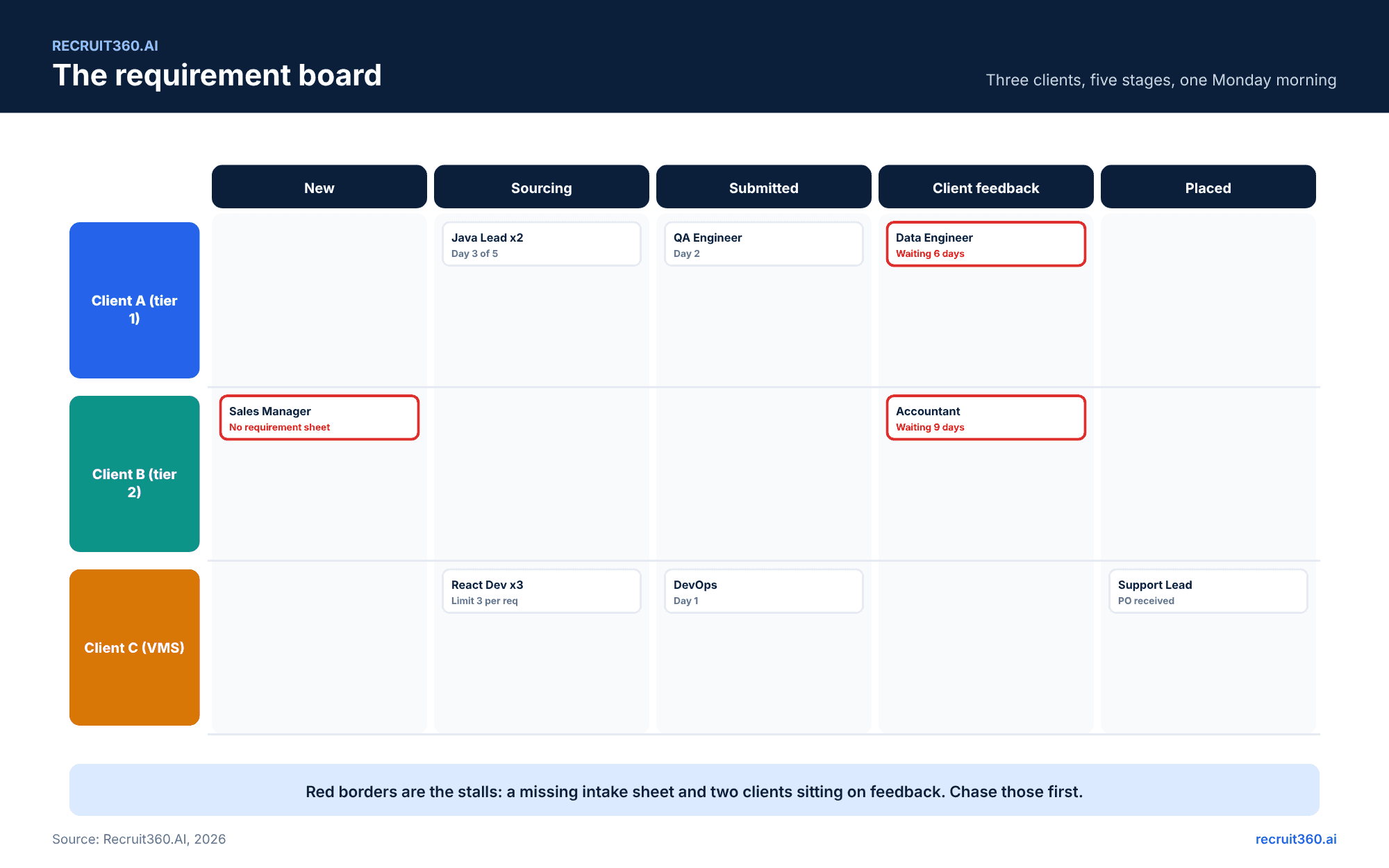
Recruit360.AI was built around this workflow. The requirement board shows every client's open roles in five stages with the age of each. Intake sheets are mandatory fields. Client tiers drive the reminder clock. Submission limits and duplicate checks are enforced at the point of submission, and every submission carries a time stamp and a source. AI matching ranks the agency's own database against each new requirement with a reason beside each name, so the same search serves every open role. Agent Calling confirms interest and notice period before a recruiter spends time, and WhatsApp templates send on each stage change. The Monday dashboard builds itself. Pricing is pay as you go, so an agency with twelve requirements this month and forty next month pays for the volume it runs. The 15-day free trial takes live requirements, not demo data.
Frequently asked questions
How do staffing agencies manage multiple clients at once?
By running every requirement through the same workflow: an intake sheet, a client tier with a response time, allocation by requirement, submission within the client's limit, a feedback loop on a clock, and a close that records the fill rate. Past about ten open requirements, the workflow needs a system rather than a spreadsheet.
What is a requirement sheet in staffing?
A short form the account manager completes with the client before sourcing starts: role, positions, location, must-have skills, budget, acceptable notice period, interview rounds, submission limit and the target start date. A requirement is not open until the sheet is complete.
How many requirements can one recruiter handle?
It depends on the roles. Eight open permanent IT requirements is a common cap; high-volume contract roles allow more. The number matters less than the rule: set a cap, and let the board show when it is hit.
How do you prevent duplicate candidate submissions across clients?
Check every new submission against all existing submissions by email, phone and name before it goes out; let the first time-stamped submission win; and ask the candidate before submitting them to a client's direct competitor. A recruitment management system does the first two automatically.
What is a submission limit?
The maximum number of candidate profiles a client accepts per requirement, usually three to five. Vendor management systems enforce it; without one, the agency's own system should refuse the extra submission.
How should an agency tier its clients?
By fees billed and by the client's responsiveness to submissions. Tier one gets the fastest response time and a weekly call; tier three gets best effort. Review the tiers every quarter.
What should a staffing agency owner check every week?
Open requirements by client and age, time to submit, submissions against limits, overdue client feedback, interview to offer ratio, and thirty-day fill rate. The weak numbers name the client to call.
Does a recruitment management system work with client vendor portals?
Yes, when the RMS can pull requirements from the portal and push submissions back. The agency then works VMS clients and direct clients on one board.